

Microsoft 365 expects big changes in 2025. This is for the Microsoft 365 Copilot Retrieval API. It is also for the Microsoft 365 Agents SDK. These changes will make finding data better. This is true across Microsoft 365. Developers can make smarter tools. These tools work within Microsoft 365. The Microsoft 365 Copilot connects things better. This helps Microsoft developers. They can make smart apps. These apps understand what’s happening. The retrieval API helps find information. It understands the situation. The Microsoft 365 Agents SDK helps with advanced AI. This is for Microsoft 365. Microsoft’s Copilot and 365 platform will change how apps are made. This new idea from Microsoft makes Microsoft 365 better. Microsoft 365 keeps making its AI smarter. The SDK and API are very important for Microsoft.
Key Takeaways
Microsoft 365 will be smarter in 2025. New tools are coming. These tools help find facts. They also build smart apps.
The Copilot Retrieval API will find facts better. It knows what you mean. It does not just look for words. It also keeps facts new.
The Agents SDK helps people make smart programs. These programs can work together. They work across Microsoft 365 apps.
New APIs are coming soon. They help see how people use Copilot. They can sum up meetings. They let apps talk to Copilot.
Developers should learn Copilot Studio. They should also learn the Agents SDK. These tools help make strong AI features. These are for Microsoft 365.
Microsoft 365 Copilot Retrieval API Evolution
The Microsoft 365 Copilot Retrieval API will change a lot in 2025. These changes will make it better. It will understand what users want. It will find the right information. The API will get data from many Microsoft 365 places. These include SharePoint, OneDrive, Teams, and Exchange. This makes the API a key AI tool. It is different from old search methods.
Enhanced Semantic Search and Context
The Microsoft 365 Copilot Retrieval API will get much better. It will improve how it searches. It will not just match keywords. The API looks at the whole question. It checks past chats. It plans how to search. This smart search breaks down hard questions. It searches many places at once. It fixes mistakes. It puts results together. This way of searching made answers 40% better. It found answers 30% more often for hard questions.
The API uses the same semantic index. This index powers Microsoft 365 Copilot. Users do not need to build their own search tools. A better data system will handle different types of content. This includes text, pictures, and diagrams. Key improvements include processing many types of documents. It uses AI to describe images. It pulls out layout information. This helps it understand better. It also breaks down documents well. It stores parts of documents separately. The API also works with AI tools. This helps AI apps work better.
Adding knowledge graphs will make searches better. The Microsoft 365 Copilot Retrieval API uses semantic search. It understands what you mean. It does not just look for words. This helps it find the best information. It gives more correct answers. A knowledge graph shows how things are connected. This helps the API understand. It adds data from business systems. These include ERP and CRM. This gives more complete ideas. Copilot can sum up data. It can analyze it. It can answer using data from many places. It gives answers that fit your needs. It also respects who can see what data. This helps search results match better. It gives more useful results. It also finds both exact and similar matches. The system understands context. This helps with hard questions. These questions need to know how data is related.
Real-time Indexing and Data Freshness
The Microsoft 365 Copilot Retrieval API will keep data fresh. It uses fast indexing methods. Microsoft 365 Copilot’s semantic index turns on automatically. It is made from Microsoft Graph data. When documents are first indexed, user documents are indexed fast. This happens in the user’s mailbox. Changes to existing documents are indexed right away. SharePoint Online documents are indexed daily. These are documents two or more users can see. This indexing needs no help from people.
The semantic index makes Microsoft 365 Copilot better. It creates vectorized indices. These are numbers that show data points. Similar data points are close together. This helps find similar things fast. It works with regular search methods. It understands what words mean. This number-based search looks through many vectors. It finds related results. This makes sure you get the newest information fast.
Granular Filtering and Personalization
The Microsoft 365 Copilot Retrieval API will have detailed filters. It will also have strong personalization. These features change for each user. The API uses custom filters. These use metadata fields. They also use connector labels. This lets developers control what information is found. Copilot uses Microsoft Graph. It adds personal details. These include user activities, emails, and meetings. This makes sure answers are right for each person’s work.
Semantic indexing makes personalization even better. It understands Microsoft Graph data deeply. This finds more exact information. It is made for each user. Copilot makes answers personal. It uses a user’s work content. This comes from Microsoft Graph. It always follows access rules. Users only see data they can view. Users can also make their own agents. These agents customize their Copilot experience. They add specific company data. This makes interactions very personal. It fits each person’s job or needs.
Scalability and Performance
The Microsoft 365 Copilot Retrieval API will change. It will handle more users. It will work faster. Copilot’s design helps it work better. It is built in parts. It works together. This makes it easier to fix problems. It also makes future changes easier. This makes the system strong. It is easy to use. It can change for company needs. This helps it handle more. The API works faster with JSON batching. This sends many questions at once. This makes grounding workflows efficient.
Changes to the design make it fast. They ensure it can handle many users. They keep it working reliably. Storing results beforehand makes it much faster. This helps with speed needs. Making search logic simple avoids problems. It stops slow performance. The design focuses on what users want. It makes answers that directly help. It gives useful ideas for Copilot. It is built to respond fast. Faisal Nasir is a main architect at Microsoft Digital. He said, “Agents in Microsoft 365 Copilot offer a way to combine smart experiences. They use shared AI power. By following rules like efficiency and scalability, we make sure these agents work well. They also give great value. They do this with little extra work.” This promise means the API will stay strong. It will power AI apps in Microsoft 365.
The Microsoft 365 Agents SDK will help developers. They can build complex systems. These systems have many agents. They work together. They automate tasks. These tasks are across Microsoft 365 apps. The SDK gives a strong base. It supports many ways to control things. It also supports many ways to talk. This makes it key for Copilot Studio.
Microsoft 365 Copilot APIs: More Than Just Finding Things
Microsoft 365 has many Copilot APIs. They do more than just find data. They let you use Microsoft 365 Copilot safely. Developers use these APIs in their own apps. They also use them in engine agents. Microsoft said at Build 2025 that developers will get even more access. This is through a new layer.
Finding, Talking, and Learning
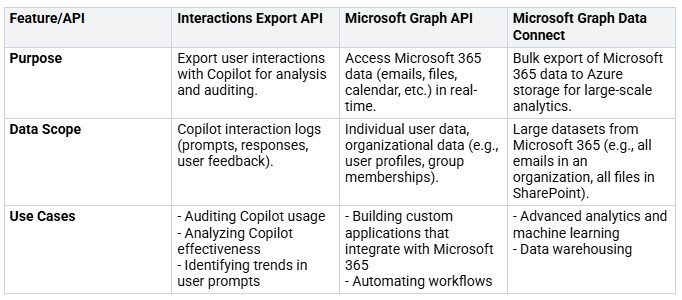
The Microsoft 365 Copilot Retrieval API is very important. It helps find data smartly. But Microsoft 365 has other strong APIs too. The Interactions Export API helps with checking things. Companies can see how people use Copilot. This API looks at what people do. It includes questions, answers, and feedback. This is different from the Microsoft Graph API. That API gets live Microsoft 365 data. It is also different from Microsoft Graph Data Connect. That handles moving lots of data. The table below shows how they are different:
The Meeting Insights API gives good summaries. These are from Microsoft 365 meetings. This API gives:
Full summaries of talks
Tasks found in the discussion
Times when people are named
The New Chat API
The Chat API is a new part. It is for the Microsoft 365 Copilot APIs. It is being tested now. This API lets developers safely add Microsoft 365 Copilot. This is into their own AI tools. Developers do not need to handle data or rules. Custom apps can send questions to the Chat API. They get full answers back. These answers use both web and work data. The Chat API can do many things:
Talk back and forth in programs
Search company information
Search the web (can be turned off)
Use OneDrive and SharePoint files for context
Making It Bigger and Developer Access
Microsoft 365 Copilot lets developers add many things. They can connect their own apps. Developers can make agents. These agents change how users experience things. They offer direct and full interactions. This is inside Microsoft 365 apps. Actions, also called plugins, work with agents. They let you connect to other systems. Copilot connectors let custom apps reach many Microsoft 365 apps. These apps work with Copilot. They include Teams, Outlook, Word, Excel, and PowerPoint. Copilot connectors also work outside Copilot. This makes them useful everywhere.

Microsoft gives tools for custom solutions. The Microsoft 365 Agents Toolkit is in Visual Studio. It is also in Visual Studio Code. It makes plugin packages. These come from OpenAPI descriptions. Kiota is another tool. This tool makes plugin packages. It uses existing OpenAPI descriptions. These tools help developers use all the Microsoft 365 Copilot APIs.
Working Together and Getting Developers Ready
Smart Agents Working Together
The Microsoft 365 Copilot Retrieval API will help agents a lot. These agents are made with the Microsoft 365 Agents SDK. They will find and use information better. This helps them make choices. It also helps them do tasks. This teamwork makes strong AI tools. It turns Microsoft 365 into a powerful AI system. Agents will understand more from Microsoft 365 data. This means smarter answers and actions. The SDK gives the tools for these new features.
New Ways to Solve Problems
This teamwork opens many new ways to solve problems in Microsoft 365. For example, finance agents can understand money plans. They can check investments. They use outside tools. They save data. They do math. Personal helper agents can book trips. They manage calendars. They set up meetings. They make summaries. They use Microsoft 365 data. They remember what is happening. Customer help agents handle hard user questions. They gather user data. They check it. They use outside tools. They message users back. They ask humans for help if needed. Research agents do deep searches. They look through files. They study information from many places. These AI agents make work easier in Microsoft 365. The Microsoft 365 Agents SDK helps create these different tools.
Getting Your Skills Ready
Developers need to get ready for these new things. Microsoft has many ways to help. These help build skills for Microsoft 365. Training you do at your own pace lets you learn when you want. Classes with a teacher are also available. AI-powered learning plans give you custom lessons. You can take tests after training. Practice tests help you see if you are ready. Special tests, like GitHub Copilot Certification, check your skills. This is for using AI to write code. It makes writing software better. Other GitHub Copilot Certifications cover basics and advanced safety. Live classes with teachers focus on Copilot in Microsoft 365 apps. These include Word, Excel, and Teams. Hands-on workshops focus on Copilot in Power Platform. These Microsoft 365 tools are very important. They help developers learn the new features of Copilot Studio and the SDK. Microsoft gives lots of training for Copilot Studio. Developers can also find help for the SDK. The SDK is key for building on Microsoft 365. Copilot Studio offers a full place to work. It helps make smart agents. Microsoft keeps adding more for Copilot Studio. Learning Copilot Studio is a must. Knowing the SDK and Copilot Studio well will be very important. Developers should look into what Copilot Studio can do. They can use Copilot Studio for advanced agent work. Copilot Studio is how agents will be made in the future.
The Microsoft 365 Copilot Retrieval API and Microsoft 365 Agents SDK will greatly change Microsoft 365 in 2025. These new things make Microsoft 365 much smarter. They also automate tasks. This changes how developers make smart apps for Microsoft 365. Companies think they will be 150% more productive. They will make decisions faster. They will work together better in Microsoft 365. Microsoft believes AI will boost productivity by 2030. Windows OS will use “agents.” Microsoft 365 Copilot and Windows will work as one. The SDK and API help developers make smarter tools. Microsoft offers tools like Copilot Studio. This helps with AI development on Microsoft 365. This future means businesses will lead. They will use integration and trust. They will use the SDK and Copilot Studio. This creates network effects. This happens through data and plugins in Microsoft 365. The Microsoft 365 Agents SDK and Copilot Studio are key to this plan.
FAQ
What is the Microsoft 365 Copilot Retrieval API?
This API helps developers. It gets info from Microsoft 365. It uses AI to know what users want. It finds the right data. This API is a main part of Microsoft 365. It helps AI tools work well.
How does the Microsoft 365 Agents SDK empower developers?
The SDK lets developers build smart systems. Many agents work together. They work across Microsoft 365 apps. It helps control things. It also helps with talking. This SDK is key for Copilot Studio. Microsoft gives this strong tool.
What new APIs are coming beyond retrieval?
Microsoft is adding new Copilot APIs. One is for checking how people use Copilot. Another sums up meetings. The Chat API is also being tested. These APIs make Microsoft 365 better. They let apps use Copilot safely.
How will the Retrieval API and Agents SDK work together?
The Retrieval API will help agents. These agents are made with the SDK. Agents will find info better. They will use it well. This makes Microsoft 365 smarter. Microsoft makes sure they work together.
What is Copilot Studio’s role in these developments?
Copilot Studio uses the Agents SDK. It is a full platform. It helps make smart agents. Developers use it to change Copilot. They add company data. Microsoft has much training for Copilot Studio.


