

AI is changing how we work. This is true for Microsoft 365. Workers need new skills. Having AI tools is not enough. You must know how to use them. This is key for Microsoft 365 Copilot. Prompt literacy is a big skill gap. Companies need to fix this. Then they can use AI fully. They can get ahead in 2025. This guide will help leaders. It will help trainers too. They can teach prompt literacy. They will use Microsoft’s help.
Key Takeaways
Prompt literacy is a key skill for using AI tools like Microsoft 365 Copilot. It helps you get the best results from AI.
Good prompts need a clear goal, context, and specific expectations. This helps AI understand what you want.
Training employees in prompt literacy can save time and improve work quality. It gives a good return on investment for companies.
Always give AI clear and specific instructions. Avoid vague commands to get better answers.
Keep learning about AI tools and update your skills. AI technology changes quickly.
Understanding Prompt Literacy for M365 AI
Defining Prompt Literacy
You need to know what prompt literacy means. It is important for your business. It is a key skill now. Prompt literacy means you can “speak AI’s language.” You make it fit your tasks. This skill is vital for tools. One tool is Microsoft 365 Copilot. Copilot uses prompt engineering. It understands what you want. It knows your business needs. It helps with tasks. These include summarizing meetings. It also drafts documents. You learn to structure prompts. This is in Microsoft 365 Copilot. This helps you get results. You get the business results you need.
Prompt Literacy: A Key 2025 Skill
Prompt literacy is a critical skill. It will be important in 2025. It helps you talk to AI well. You learn to set rules for AI. This includes sentence length. It also includes format. You also learn to change AI’s output. This is for different people. It could be for you. It could be for experts. Good prompt literacy means you give details. You give context. You give examples for AI. For instance, you can ask for “a poem in iambic pentameter with a languid tone.” Do not just ask for “a poem about summer.” You also learn to test your prompts. You make them better. This helps you understand AI. You make results better. You add keywords. You change settings. You check AI content for facts. Many companies have problems. Employees have different AI skills. Some employees do not know enough AI. Some do not trust AI. This makes prompt literacy more important.
ROI of Prompt-Literate Employees
Smart employees help your company. They bring clear benefits. You get a good return on investment (ROI). Big companies can get 116% ROI. This is over three years. Small and medium businesses (SMBs) get more. They see 132% to 353% returns. Lumen Technologies is an example. They expect to save $50 million each year.
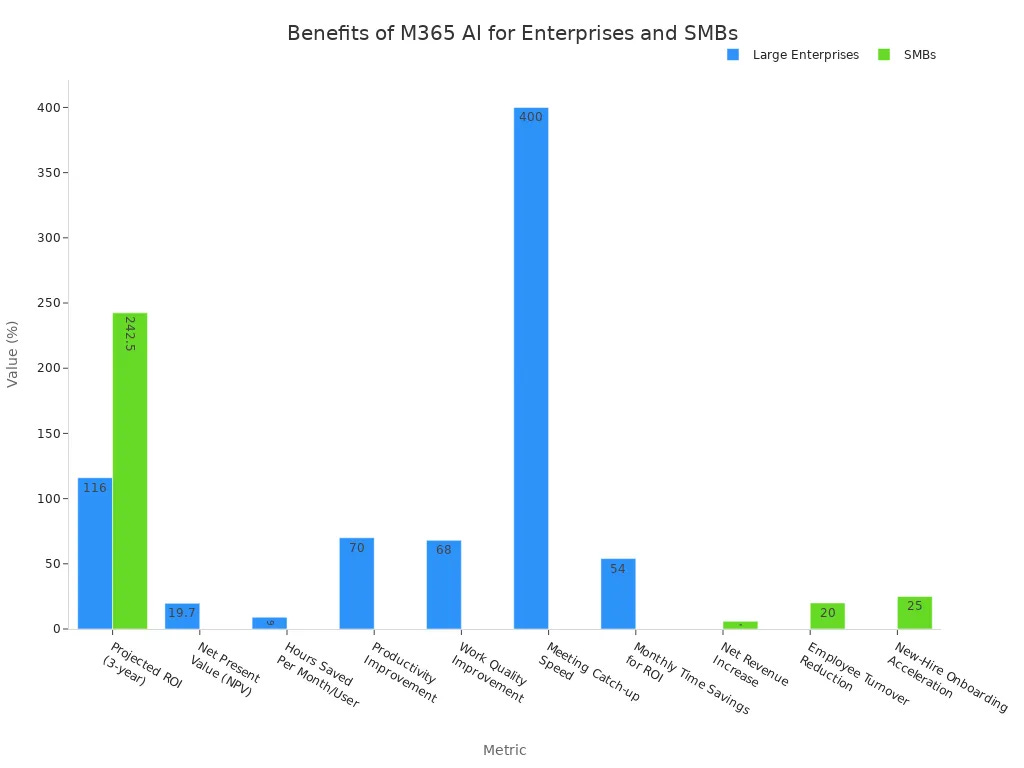
Employees save much time. They save about 9 hours each month. This is in big companies. Vodafone said employees saved 3 hours weekly. Your team works better. 70% of users feel more productive. 68% say work quality is better. Companies like Newman’s Own did more campaigns. They tripled their marketing campaigns. They also made briefs faster. You can have fewer employees leave. This is a 20% reduction. New hires learn faster. This is 25% faster for SMBs. You can catch up on meetings. This is almost four times faster. Investing in Copilot pays off fast. An employee only needs to save 54 minutes monthly. This shows AI skills are valuable.
Mastering Microsoft 365 Copilot Prompts
You need to learn prompt engineering for Microsoft 365 Copilot. This helps you get the best results. Good prompts have key parts. These include a clear goal. They have relevant context. They have a source for information. They also have specific expectations. You can structure your prompts well. This makes you work better and faster.
Crafting Clear AI Goals
You must clearly tell Microsoft 365 Copilot your goal. What do you want the AI to do? This is the first step for good prompts. Microsoft’s guide shows four main parts. These are your Goal, Context, Source, and Expectations. Your goal should be clear. Do not just ask for “a report.” Instead, ask for “a summary of Q3 sales.” Focus on top-performing regions. This tells Microsoft 365 Copilot what you need.
You should be clear and exact. Tell Microsoft 365 Copilot what you want. Include the topic, purpose, tone, and length. For example, ask for “an email to the marketing team.” It should be about the sales campaign. Highlight key dates and tasks. This is better than a vague request. If the first answer is not right, ask Microsoft 365 Copilot to try again. You can give more exact instructions. For example, “Try again. Give me the exact reason for the billing change.” This helps you make the output better.
Providing Essential Context to AI
Giving Microsoft 365 Copilot enough context is very important. The AI cannot guess what you mean. You need to give background information. This helps Microsoft 365 Copilot understand your situation. For example, tell it why you need the information. Tell it who will read it. Say what kind of output you need. “Create a sales report using Q1 and Q2 data for the executive team.” This gives needed details. This helps Microsoft 365 Copilot make a good report.
Many people do not give enough context. They think the tool knows everything. Even simple bullet points help a lot. They make results better. They reduce editing. You can use frameworks to help. The GCES framework has Goal, Context, Expectations, and Source. The RISEN framework uses Role, Instructions, Steps, End goal, and Narrow. For context, explain why the information is needed. Tell Microsoft 365 Copilot how it will be used. For example, “I am getting ready for a board meeting next week.” It is to show progress on our plan. This gives Microsoft 365 Copilot the needed background.
Structuring Prompts for Copilot
You need to structure your prompts well for Microsoft 365 Copilot. This makes the AI work better. Think of your prompt as talking to a friend. Use normal language. For example, “Make a PowerPoint about our new product.” It is for leaders. This is clear and easy to understand. You can also ask Microsoft 365 Copilot for ideas. This helps it understand what you need.
The best prompts for Microsoft 365 Copilot have four parts:
Goal: What do you want to do?
Context: What important background information is there?
Expectations: What look and feel do you want?
Source: Where should Microsoft 365 Copilot get its facts?
You can also tell Microsoft 365 Copilot what job to do. For instance, “Act like a prompt engineer. Write a better prompt to reach [goal].” You should also know that the order of your prompts matters. Microsoft 365 Copilot often uses instructions that come later. To work faster, make prompts for each Microsoft 365 app. For example, in Excel, be clear about data. You might say, “Find trends in monthly money data.” Look at columns B through M. Highlight seasonal patterns and odd results. Keep your files neat. Use good names and details. This helps Microsoft 365 Copilot find information.
Practical Prompting Techniques for AI Use
You can make your AI tools work even better. Use these practical techniques. They help you get exactly what you need.
Using Roles in Prompts
Give your AI a role. This helps it understand how to respond. For example, tell Copilot to “Act like a business consultant.” Then ask it to “Provide a market analysis.” This guides its tone and level of detail. You can ask it to “Draft an executive summary for senior leadership.” Or, “Write training instructions for new employees in simple, step-by-step language.” Assigning a role helps the AI adapt its style. It matches the intended audience. This technique is great for writing and solving problems. It controls the style, tone, and accuracy of the AI’s output. You can tell the AI to be a “food critic” or a “mathematician.” This shapes how it processes information. It also impacts the style or accuracy of its answers.
Output Formats and Constraints
Tell the AI how you want the information presented. This is very important. You can ask for “a markdown table” or “a concise summary under 150 words.” These are constraints. They help you get focused output. If you want shorter answers, ask for “truncated outputs.” You can also tell the AI to “Maintain the specified format throughout the entire response.” If you need a specific format, like JSON, be very clear. Say, “Generate ONLY the JSON with no additional text.” You can also provide examples of the format you want. This helps the AI understand. You can use specific instructions to guide the AI. For instance, “Summarize the following text in 3 bullet points.” Then provide examples of what good output looks like. This helps calibrate the AI.
Iterative Prompt Refinement
You might not get the perfect answer on the first try. That is okay. You can refine your prompts. Look at the AI’s response. Then, give it more specific instructions. You can add more details or change your request. This process of trying, checking, and improving is called iterative refinement. It helps you get closer to your desired outcome. Keep experimenting with your prompts. You will learn what works best.
Designing Prompt Literacy Training for Employees
You need a good plan. It will teach your team about AI. This plan helps build training. First, know what employees already know. Then, make lessons for different M365 AI tools. Last, let them practice. Use real work situations.
Assessing Employee AI Skills
Know your team’s AI skills. This helps make good training. Start by checking what they know. This builds prompt literacy. Johnson & Johnson used a big language model. It rated tech workers’ skills. They checked 41 future skills. Employees also rated themselves. Scores were good if they matched. This helped skills grow. It was not for performance. Workers trusted the system.
Use surveys to check employee comfort. Ask about Microsoft M365 AI tools. Ask if they feel confident. Find out what features they use. Learn what is hard for them. Ask what they want to learn. Interviews give more details. They add to survey data. Do skill checks. Find skills your employees need. See how they use M365 apps and AI features.
After training, check skills again. This shows improvement. Look at how much work gets done. See if AI saves time. Or if it makes more output. Get feedback on the training. Is it helpful and clear? Use this to make changes later. Put AI use in performance reviews. This shows good work. It also fixes problems. Watch AI feature use over time. This shows who needs more learning. It also shows unused new features. This full plan makes a strong AI enablement strategy.
Targeted M365 AI Training
Design learning that fits your team. Not everyone needs the same lessons. Make special learning paths. Learn for Organizations has training modules. They are for specific jobs. These help you change content. Hands-on work is key. Use workshops. Show real examples. This helps employees see how tools help daily tasks.
Think about a module. Call it “Working with AI tools.” This can be for teachers. Or business users. Or data engineers. Learning goals might include checking Designer’s quality. You can see if Reading Coach works well. Check Copilot’s effect in Excel. This is for data analysis. Exercises can include building plans with Copilot. You can also design a poster. Use Designer.
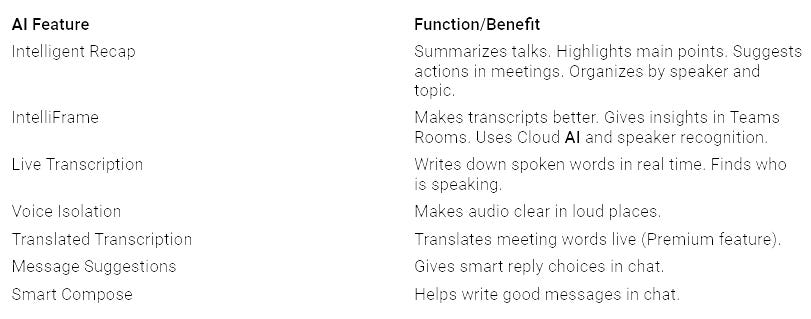
Here are some M365 AI features. Here are their benefits:
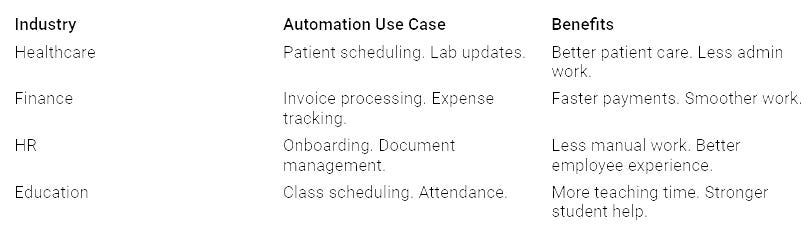
These tools also do tasks automatically. This is in many industries:
This focused plan makes sure your strategic AI plan fits needs.
Hands-On Practice and Scenarios
Make your learning practical. Hands-on practice helps people learn. A store company used real learning. Users brought their own tasks. Trainers showed how Copilot helped. This hands-on way led to 78% of users. They used Copilot in one week. This was faster than 11 weeks. A services firm used two steps. First, “Copilot Essentials.” Then, workshops for services. Consultants practiced Copilot. They used real client work. This link to paid work meant 95% of people. They used Copilot in 48 hours.
Good ways to learn include job-based paths. Make different paths. For writers, analysts, or project managers. Add real situations and exercises. A government group saw a 73% increase. They felt it was more helpful. This was with this method. Make focused content. This is for using M365 AI tools. It is for specific Microsoft 365 apps. Hold department workshops. These are 2-hour sessions. They look at job-specific situations. Use interactive lessons. These are guided practices. Users practice safely. Start a champions network. Help teams share good ideas. Offer office hours for help. Show successful uses to others. This builds strong AI literacy in your company.
Avoiding Common AI Prompting Pitfalls
You can make your experience with AI tools much better. You must avoid common mistakes. These mistakes can lead to poor results. Learn to craft your prompts carefully.
Vague Instructions
You might get generic answers from AI. This often happens when your instructions are not clear.
Your AI prompts are underperforming because they’re vague. They lack context. They fail to guide the model toward your real goal. Treat prompts like instructions for a junior research assistant. They should be specific. They should be clear. They should be structured for the exact outcome you want. Vague prompts lead to vague answers. Specificity is non-negotiable. If you type ‘make this better’ without direction, you’ll get generic, shallow output. The LLM works with what you feed it. If that’s fuzzy, your results will be too. This aligns with the ‘garbage in, garbage out’ principle. Imprecise inputs directly lead to unfocused outputs.
Do not just say, “Make it good.” This gives the AI no real direction.
Vague instructions, such as ‘Make it good,’ result in generic or irrelevant outputs. This is because the AI lacks specific guidance.
To avoid generic or irrelevant outputs, prompts should be specific and detailed. For instance, instead of ‘Write a knowledge base article,’ a better prompt would be ‘Write a knowledge base article explaining how to troubleshoot a VPN issue using these steps.’
Similarly, for image generation, ‘Create an image of a cat’ is vague. ‘A realistic orange tabby cat sitting on a Victorian-style armchair, with sunlight streaming through a nearby window, creating a cozy ambiance’ provides the necessary detail for better results. You need to tell the AI exactly what you want. Be specific.
Conflicting Commands
Sometimes you give the AI mixed signals. You might tell it to be brief. Then you tell it to include many details. The AI will struggle to follow both rules. It might ignore one command. It might give you a confusing answer. Always review your prompt. Make sure all parts work together. Ensure your instructions do not contradict each other.
Ethical Prompting
You have a responsibility when using AI. You must think about ethics.
Minimize bias and discrimination in prompt design. This ensures fairness in AI outputs.
Prioritize user privacy. Be transparent about data collection and usage.
Foster accountability. Clearly define roles and responsibilities in the AI prompt creation process.
Engage diverse stakeholders. This incorporates various perspectives and needs.
Maintain transparency in AI decision-making. This builds trust and reduces misunderstandings. Your prompts should promote fairness. They should avoid bias.
Transparency: Clearly communicate how AI operates. Explain its purpose. Explain data collection and usage. Explain algorithms and decision-making processes. This builds trust.
Fairness and Equity: Design prompts to promote equitable access. Regularly assess AI outputs for bias. Involve stakeholders. Provide inclusive training.
User Privacy: Safeguard user privacy. Use ethical data collection practices. Ensure informed consent. Maintain transparency in algorithms.
Avoiding Bias: Implement bias mitigation strategies during design. Use diverse datasets. Continuously test AI outputs for fairness.
Accountability: Define roles and responsibilities for AI decisions. Ensure algorithms reflect fair practices. Be prepared to address AI mistakes.
Building Trust: Be transparent about AI systems. Prioritize privacy. Provide clear communication on capabilities and limitations. Encourage user feedback. Always protect user privacy. Be transparent about how you use data. Define who is responsible for AI decisions. This builds trust. It ensures your AI use is responsible.
Keeping Up with AI Skills
You must help your team keep learning about AI. This means checking how well AI tools work. It also means keeping skills strong.
Checking How Much AI Is Used
You need to know if your AI work is helping. Checking AI use shows how prompt literacy helps. You can watch many things. This shows how AI helps your business.
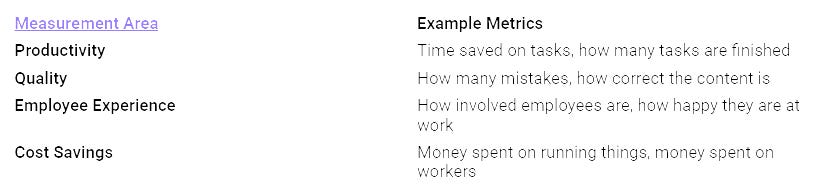
These numbers help you see what AI really adds. They show where you can do better.
Always Learning About AI
AI tools change quickly. You must keep learning. Make a place where everyone tries new things. Praise new ideas. Leaders should use AI tools like Microsoft Copilot. They should share their wins. This makes new ways of working normal. Give special training programs. These go past basic lessons. Offer hands-on learning for certain jobs. Build a group of “champions.” These are early users who can help others. Clear talking is important. Everyone needs to know why you use AI. Set up ways to get feedback. This makes users feel heard and helped. Dr. Asim Ali from Auburn University said, “Our goal is to provide the best environment on campus for students, professional staff, and faculty to learn about different resources, tools, and ideas.” This constant learning makes your team better at AI.
Changing with New AI
AI skills keep getting better. Your training must change too. You need to make your systems ready for AI. This means using strong cloud systems. It makes sure AI tools are easy to get and grow. Put AI into your current work tools. This makes it faster and safer to use. You must also keep AI models fresh.
Watch All the Time: Check how well AI models work often.
Update Regularly: Update and teach AI models again often. This helps them use new information and business needs.
Handle AI Ethics: Deal with fair use concerns and lower bias. Use many kinds of training information.
This plan makes sure your team stays good with the newest AI changes.
Prompt literacy is very important. It helps you get the most from AI. This is true for Microsoft 365 Copilot. You must teach employees. Teach them basic rules. Teach them how to use AI. Think of this as an investment. It helps your people. It helps your digital changes. This makes your workers ready for the future. It helps you beat other companies. It makes new ideas happen. This advantage helps your company. It will help in 2025 and later.
FAQ
What is prompt literacy?
Prompt literacy means you know how to talk to AI. You give clear instructions. This helps AI understand your needs. You get better results from tools like Microsoft 365 Copilot.
Why is prompt literacy important for M365 in 2025?
AI tools are everywhere in M365. Prompt literacy helps you use them well. You save time and work smarter. This skill gives your company a big advantage.
How can I start learning prompt literacy?
Begin with Microsoft’s free training. Practice with Copilot. Give it clear goals and context. Refine your prompts. Learn from your results.
What are common mistakes to avoid when prompting AI?
Do not give vague instructions. Avoid conflicting commands. Always think about ethics. Ensure your prompts are fair and clear.


