

Cyber threats get harder every day. Cybercrime will cost a lot by 2025. It will be $10.5 trillion USD. Many groups are attacked. Last year, 83% had an insider attack. Also, 65% of money groups faced ransomware. More cyber threats need smart solutions. AI-driven security helps. Microsoft Security Copilot is a new AI helper. It helps security teams. The service uses Security Compute Units. This is how it charges. This blog explains Microsoft Security Copilot. It also explains how it charges. It talks about what it does. It covers how to use it. It also covers what it costs for security pros.
Key Takeaways
Microsoft Security Copilot is an AI tool. It helps security teams find and fix cyber threats.
Security Compute Units (SCUs) measure the computer power. This power runs Security Copilot’s AI tasks.
Companies pay for SCUs by the hour. They can choose how many SCUs they need.
You can change your SCUs. This helps save money. You can add more when busy. You can use fewer when it is calm.
Monitoring SCU use is important. It helps manage resources. It also helps control costs.
Introducing Microsoft Security Copilot
SCU Fundamentals
Security Compute Units, or SCUs, are key. They are how Microsoft Security Copilot charges. They show the computer power needed. This power runs the AI tasks. Think of SCUs as the engine. It powers the AI helper. They measure how much work is done. This includes looking at security data. It also includes finding new information. And it includes fixing problems automatically. SCUs are used everywhere. They are used for Security Copilot alone. They are also used when it’s part of other Microsoft security tools. This unit helps measure things. It helps manage the AI’s computer use.
Consumption Model
Microsoft Security Copilot uses a special payment plan. It’s called a provisioned capacity model. This means companies set aside SCUs. They do this for their security needs. They don’t pay for each AI question. They also don’t pay for each action. Instead, they get a set amount of computer power. This plan helps with budgeting. It makes costs clear. It also makes sure power is always ready. This is for important security jobs. One SCU costs about $4 USD per hour. This clear price helps security teams. They can guess their costs well.
SCU Provisioning
Companies can change their SCUs easily. They can get the power they need. They can change it as things change. This plan has no long-term contracts. Security teams can add more SCUs. They can also use fewer SCUs. This depends on how much work there is. It also depends on their budget. This flexibility saves money. It also makes sure they have enough AI power. This is for their security work. For example, they can add more SCUs. This is for big threats or investigations. They can use fewer SCUs during calm times.
Monitoring SCU Usage
It’s important to see how SCUs are used. Microsoft has a special dashboard for this. This dashboard helps security experts. They can watch their SCU use live. It shows how much computer power is used. This is for their Microsoft Security Copilot. This tool helps companies understand their use. It also helps them decide about SCUs. The dashboard is clear. It helps use resources well. This stops them from having too much or too little AI power.
Understanding Security Compute Units (SCUs)
SCU Fundamentals
An SCU is a unit of power. It is in Microsoft Security Copilot. It helps with billing. SCUs show the computer power. This power runs Security Copilot tasks. This is for both alone and built-in uses. Many things use SCUs. These include running questions. They also include using summary tools. Microsoft Copilot for Security use is measured in Security Compute Units. These units measure the computer power. This power is needed for its tasks. An SCU measures the computer power. This power runs Security Copilot tasks.
Consumption Model
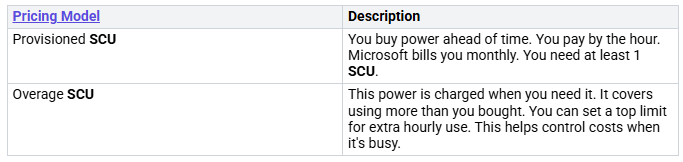
Microsoft Security Copilot uses a special payment plan. It is a provisioned capacity model. Users choose how much power they need. Costs are based on this chosen power. They are not based on actual use. This model charges users by the hour. This is for their SCU use. SCUs measure the data processed. This is by Copilot for Security. They are key to its price. They are key to how it grows. Chosen power is charged hourly. Extra power is charged by actual use. Users can choose SCUs. This handles normal work. They can change them as needed. Extra amounts can handle sudden high needs. This makes sure extra SCUs are ready. This is for when chosen units run out. Extra units are charged when used. Users can set them as unlimited. Or they can set a max amount. Billing for chosen power is hourly. Any use in the same hour counts as a full SCU. For extra units, SCUs are charged precisely. This is for exact units used.
For example, a user asks a question. It uses 3 SCUs. They also use summary tools. This uses 0.5 SCU. Total use is 3.5 SCUs. The charge for that hour is based on four chosen SCUs. If the user also runs a promptbook. This uses another 3.7 SCUs. The total becomes 7.2 SCUs for the hour. The charge for that hour will be based on four chosen SCUs. And 3.2 extra SCUs.
SCU Provisioning
Users can choose Security Compute Units. They can do this in two ways. One is in the Copilot for Security portal. The other is in the Azure portal. It is good to start with a few SCUs. For example, three SCUs are good. This is for trying it out. Users then change this number. This is based on what they really need. To save money, turn on SCUs only when needed. Watch their use all the time. Turn them off after testing. Turn them back on when testing starts again. For regular use, automation can help. It can add SCUs during busy times. It can reduce them at night.
Here are the main ways to get SCUs:
Option 1 (Recommended): Get power through Security Copilot
Sign in to Security Copilot (
https://securitycopilot.microsoft.com
).
Choose Get started.
Set up a workspace. Type a name. Choose Continue.
Set up security power. Choose the Azure subscription. Link power to a resource group. Add a name. Choose where to check prompts. Say how many SCUs are needed. (And optional extra units).
Choose how to share data. Then choose Continue.
Confirm you agree to the rules. Then choose Continue.
Choose if Security Copilot should save actions. This includes admin actions, user actions, and system replies. Then choose Continue.
Check and change who can use Security Copilot. Then choose Continue.
A confirmation page appears. Choose Finish.
Option 2: Get power in Azure
Sign in to the Azure portal (
https://portal.azure.com
).
Search for ‘Security compute’. Choose Microsoft Security compute capacities.
Choose Resource groups.
Under Plan, choose Microsoft Security Copilot. Then choose Create.
Choose a subscription and resource group. Add a name. Choose where to check prompts. Say how many SCUs are needed. (And optional extra units).
Confirm you know the rules. Then choose Review + create.
Check information. Choose Create.
Choose Finish setup in the Security Copilot portal.
Monitoring SCU Usage
Watching SCU use is very important. It helps manage resources well. A dashboard is built into the product. This dashboard makes it easy to watch SCUs. It shows how they are used. It gives clear details about SCU use. This lets customers change their power as needed. Dashboards for watching use show SCU use clearly. They show which tools are used. They show who uses them. This helps companies use their security compute units best.
Deploying Security Copilot
Deployment Prerequisites
You need some basic things. This is to use Security Copilot. Microsoft 365 Apps must be there. Copilot needs third-party cookies. This is for apps like Word or Excel. Check your privacy settings. These settings affect Copilot. Device licenses for Microsoft 365 Apps do not work. Microsoft OneDrive is also a must. It helps with file restore. Users need a OneDrive account. Microsoft Outlook works with old and new versions. Copilot only uses main mailboxes. These are on Exchange Online. It does not work for archive mailboxes. It also does not work for shared mailboxes. Microsoft Teams Copilot works on many devices. You need to turn on transcription. Or you need to turn on recording. This is for Copilot to use meeting content. Teams Phone works with VOIP and PSTN calls. A Microsoft 365 Copilot license is needed. This is for VOIP calls. For PSTN calls, you need more. You need a Teams Phone license. You also need a calling plan. Microsoft Loop must be on. This is for using Copilot with Loop. An Azure subscription is also needed. Users need Azure owner permissions. Or they need Contributor permissions. This is at the resource group level.
Setup Process
Setting up Microsoft Security Copilot has clear steps. First, go to the securitycopilot.microsoft.com portal. Then, pick an Azure subscription. Also pick an Azure Resource Group. Choose a place for prompt evaluation. This keeps data in your home region. Next, set the number of Security Compute Units (SCUs). Agree to the rules. Finally, give roles to users. This lets them use Copilot for Security. Users can also set up power in Azure. They search for ‘Security compute’. They choose ‘Microsoft Security compute capacities’. Then they pick a subscription. They also pick a resource group. They add a name. They choose the location. They also say how many SCUs.
Access and Integration
Microsoft Security Copilot uses special ways to log in. Azure B2B and Guest Accounts can use ‘Tenant Switching’. This is in the standalone portal. Granular Delegated Admin Privileges (GDAP) manage access. This is through the Partner Center. Azure Lighthouse helps with access. This is through the Azure Portal. Security Copilot uses on-behalf-of authentication. This gets security data. It uses its active Microsoft plugins. Specific Security Copilot roles must be given. This is to people or groups. This gives them access to the platform. Microsoft Entra and Azure Role-Based Access Control (RBAC) decide plugins. These are in prompts. The Security Copilot role also controls other things. This includes settings. It also includes giving permissions. RBAC rules help manage access well. A user without an Entra Role should not get access. This is to Microsoft Security Copilot. This stops wasting SCU resources. Owners should manage custom plugins. This makes sure they are checked. They are also tested. This is before wider use.
Extending Functionality
Plugins make Microsoft Security Copilot much better. Developers can make new custom plugins. They follow steps to make these plugins. Then they add and manage them. This is within Security Copilot. Using plugins helps connect services. It also lets you make custom plugins. Copilot Studio gives tools. These are for making custom Copilot plugins. For example, IPinfo gathers data. This is about internet devices. Jamf gives MDM inventory info. Netskope offers security and networking. Pure Signal Scout gets threat info fast. Quest Security Guardian finds weak spots. Red Canary makes security better. ReversingLabs summarizes file reports. Saviynt shows identity risks. ServiceNow SIR changes security. SGNL helps understand access. Shodan finds internet devices. Silverfort helps find threats. Splunk has AI solutions. Tanium checks incidents. TufinMate manages firewalls. UrlScan checks website safety. Valence Security stops SaaS threats. Whoisfreaks improves cybersecurity. Using plugins helps tailor suggestions. It adds features. It also adds data sources.
Cost and Licensing for Copilot
SCU Pricing
Microsoft Security Copilot charges based on what you use. You pay for the computer power you use. Each SCU costs about $4 each hour. Microsoft sends bills every month for this. This way of pricing helps companies control their money.
Estimating Costs
Many things change how much Copilot costs. SCUs are the main cost. They show how much computer power is used. Bigger data needs more SCUs. Harder tasks, like summarizing problems, also use more SCUs. Using it often, especially in security centers, uses more SCUs. Azure’s pricing also changes costs. Where it is set up can change prices. Other Azure services linked to Copilot affect costs. Extra things, like storage, also cost money.
Cost Optimization
Companies can save money in many ways. They can share systems for testing. This saves money. Protecting important services from attacks helps avoid surprise costs. Using Arm instances can save a lot of money. Tools that watch cloud costs show how money is spent. These tools help use resources better. Teaching employees to care about costs also helps. Training developers on how to save cloud costs is key.
Licensing Overview
You need certain licenses to use Copilot. Microsoft 365 E3/E5 licenses are needed first. You also need an extra Copilot Add-On License. This usually costs $30 per person each month. It turns on the AI features. Other costs include setting it up. This means IT setup and linking it. Training costs are also there. This means teaching people how to use it well.
Microsoft Security Copilot changes cybersecurity a lot. It makes a company’s security better. It also makes work run smoother. Knowing about security compute units is key. This helps manage resources well. It also helps control costs. Using AI-powered security gives big benefits. It finds threats right away. It also fixes problems fast. This helps against new cyber threats. AI in cybersecurity will keep getting better. Microsoft is leading this change. It focuses on AI defense. It also protects AI systems. This means a safer future.
FAQ
What is Microsoft Security Copilot?
Microsoft Security Copilot is an AI helper. It assists security teams. It finds threats better. It fixes problems faster. This tool uses AI. It makes security work easier.
How do Security Compute Units (SCUs) work?
SCUs measure computer power. Microsoft Security Copilot uses this power. Companies set up SCUs. They pay by the hour. This plan gives them power. It makes AI costs clear.
How can organizations optimize SCU costs?
Companies can save money on SCUs. They change SCUs as needed. They watch SCU use. They turn off SCUs when not used. This helps control spending.
What are the prerequisites for deploying Security Copilot?
To use Security Copilot, you need things. Users need an Azure account. They need Azure permissions. Microsoft 365 Apps must be there. OneDrive and Exchange Online are also needed.


