

Microsoft Fabric by Design” is a smart plan. It uses Microsoft Fabric’s tools. These tools create strong data solutions. They can grow big and are well-managed. This plan helps you get the most for your money. It builds systems that will work in the future. It makes sure data is private and safe. The data analytics market is getting bigger fast. It is expected to grow 25.5% each year. This growth is from 2025 to 2032. Companies are using cloud data solutions a lot. Gartner thinks 90% will use mixed cloud plans by 2027. This plan makes data systems flexible. They can grow as needed. It stops systems from becoming old too fast. It gives good returns for a long time. This careful plan in Microsoft makes data better. It keeps data private everywhere. The full fabric platform handles many data needs.
Key Takeaways
Microsoft Fabric helps make good data systems. These systems can get bigger. They also save money. They keep data secret and safe.
OneLake is a main spot for all data. It makes sharing data simple. It stops data from being copied a lot.
The Medallion Lakehouse Architecture sorts data into three parts. These parts are Bronze, Silver, and Gold. This makes data neat and ready to use.
Microsoft Fabric keeps data secure and private. It uses tools like Microsoft Purview. These tools manage who sees data. They also follow rules.
Microsoft Fabric helps reports look alike. It uses themes and styles. This makes all company reports match.
Core Principles of Microsoft Fabric
Unified Analytics Vision
Microsoft Fabric has a single vision. It brings together many ways to analyze data. All tools work as one. This makes data analysis easier. The platform combines several key parts. Power BI makes interactive charts. A data warehouse stores data. Data Factory builds data flows. Data science helps with predictions. Data engineering builds data pipelines. Real-time analytics looks at live data.
Users do not need to switch tools. All parts work well together. Fabric includes Spark Pools for big data. Synapse Data Science builds machine learning models. Synapse Data Warehouse uses SQL for data. Synapse Real-Time Analytics queries live data. Power BI shows data from OneLake. Data Activator watches data and acts. Microsoft Purview keeps data safe. This platform makes data work simple.
OneLake as Data Foundation
OneLake is the base for Microsoft Fabric. It is like one big data lake. This stops data from being copied. Every Fabric user gets one OneLake. Teams can store their data there. OneLake gives one way to see all data. This includes data from many clouds. It stops data from being spread out.
OneLake makes sharing data easy. Users can combine data directly. No complex steps are needed. It has one simple way to find data. This works no matter where data is stored. OneLake uses ‘shortcuts’. These link to data stored elsewhere. This includes Azure Data Lake Storage. You do not need to move data. Shortcuts connect data logically. Data stays in its place. OneLake gives safe access to data. OneLake uses Delta Lake for data. This makes data reliable. It supports open formats. This helps with big data.
Data Governance, Security, and Privacy by Design
Microsoft Fabric protects data. It keeps data safe and private. Microsoft Purview helps with this. It finds sensitive data. It makes sure rules are followed. It tracks who does what. Labels from Purview protect Fabric data. These labels can be set by default. They can also be inherited. Labeled data stays safe when moved.
Purview Data Loss Prevention finds sensitive info. It works in Fabric and Power BI. This helps fix risks. Workspace roles control access. This helps teams work together safely. Data-level controls manage access. They control tables, rows, and columns. This works in SQL, warehouses, and KQL. Purview Audit tracks user actions. This helps stop bad access. It meets rules. Microsoft Fabric has many safety certificates. These show it meets standards. OneLake Data Hub helps find data. It makes data reliable. Owners can promote good data. Organizations can certify data. This builds trust. Tags help organize Fabric items. Data catalogs manage data. They check for rules. Access control uses Fabric and Microsoft Entra. This gives exact control.
Capacity-Based Resource Management
Microsoft Fabric Capacity combines computing needs. It uses one standard measure. This makes managing resources easy. Capacity Units (CUs) are these resources. They let resources change easily. They adjust to how much work is done. Resources can grow or shrink fast. This uses cloud power. Upgrading SKUs changes CUs. This matches project needs. This saves money. It makes sure resources are ready.
Burstable capacity makes things faster. It lets work use more resources. This helps with busy times. It can make a job much quicker. This feature uses CUs from a shared pool. It uses unused power from others. Availability depends on the pool. Microsoft manages resources. This keeps things fast. It uses smoothing to handle busy times. Capacity smoothing balances resources. It works when busy or not. For quick jobs, demand evens out in five minutes. For background jobs, it spreads over 24 hours. This avoids problems. It keeps things running fast. Planning can use average usage. Interactive smoothing spreads query use. This stops overloads. It keeps the system stable.
Architectural Patterns for Fabric Solutions
Medallion Lakehouse Architecture
The Medallion Lakehouse Architecture organizes data. It uses Microsoft Fabric. It has three layers. The Bronze layer holds raw data. This data is not changed. It can be messy or neat. It stays in its first form. It is a good source for redoing things. The Silver layer cleans data. It takes data from Bronze. It makes data neat and structured. It also mixes it with other data. This gives a full picture. The Gold layer makes data even better. It uses data from Silver. This layer helps with business needs. Tables here often use a star shape. This makes them work fast.
The Medallion Architecture in Microsoft Fabric Lakehouses has these steps:
Bronze Layer: Raw Data Ingestion and Storage
Find where data comes from.
Put raw data in using Spark Pools.
Save raw data in Delta Lake.
Silver Layer: Cleaned and Processed Data
Clean and change data. Use Spark Pools.
Add more to the data.
Save changed data in Delta Lake.
Gold Layer: Aggregated, Optimized, and Business-Ready Data
Group data for ideas.
Make data ready for reports.
Change data automatically. Use Dataflows.
Spark Pools, Delta Lake, and Dataflows are key Microsoft Fabric tools. They work across these layers.
Workspace Design Models
Good workspace designs organize data. They also manage who can see it. Companies pick models based on how they work.
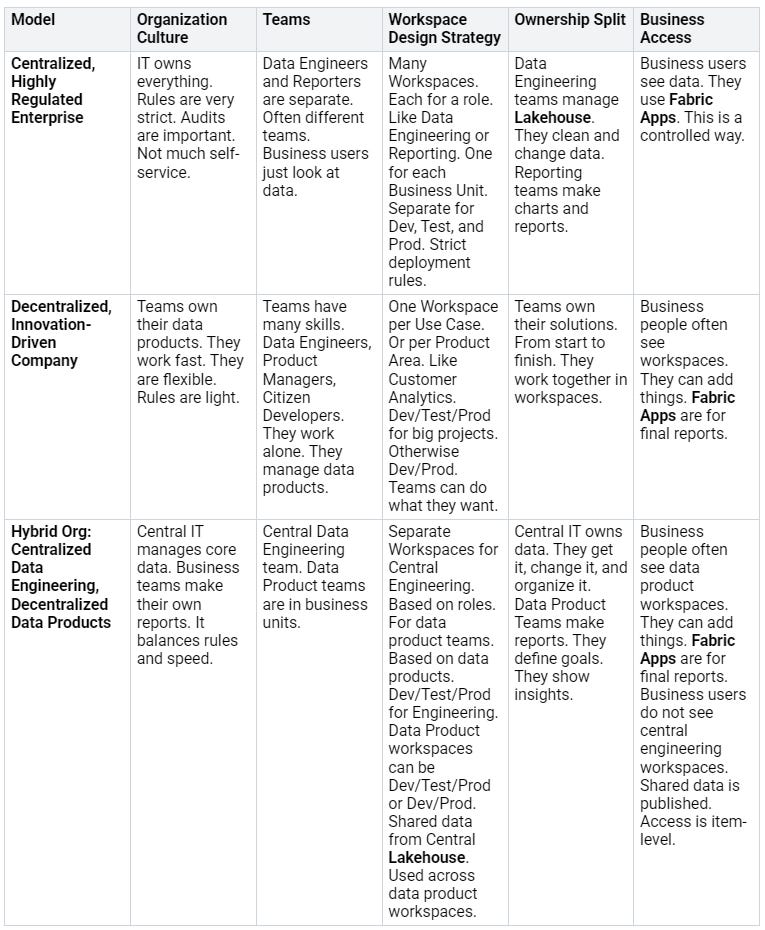
Smaller workspaces are better. They have one purpose. This avoids too much work. It helps with the 1,000-item limit. Workloads can be split into workspaces. These run on different capacities. This helps manage rules and resources. A ‘Core Data Provider & Managed Self-service BI’ plan. It makes self-service BI better. It means ‘strict in the middle, flexible on the edges’. This includes a reporting hub workspace. Only the data team has full access. Data access uses SQL permissions. OneLake shortcuts link to data. This is in other workspaces. No need to copy data.
Data Mesh Principles
Microsoft Fabric tools use data mesh principles. This is for big data systems.
Domain-oriented ownership: Microsoft Fabric has all the tools. This makes teams easy to set up. OneLake Lakehouse uses one file type. This makes sharing data easy.
Data as a product: Fabric helps find data products. It works with Microsoft Purview. OneLake data hub holds shared items. Standard data types let Spark and SQL engines read data. The ‘Shortcuts’ feature shares data safely.
Self-serve data platform: Fabric is a SaaS model. It hides hard platform details. Teams do not need to manage computers.
Integrating Existing Data Assets
It is important to add old data. This includes data from your computers. And cloud data. Into Microsoft Fabric.
Use Microsoft Purview. This helps manage all data. It finds and sorts data. Across OneLake, Azure, and your computers.
Follow good rules for data. Clearly say who owns data. Make good data rules. Control who can see data. Use Azure AD and Fabric’s security.
Set up data paths. Make them strong and flexible. Use ETL/ELT tools. And cloud tools in Microsoft Fabric. These get, change, and load data. From many places.
Keep data safe. Use strong security. This includes hiding data. And giving access based on roles.
Manage data flow. Across cloud and local systems. Use data tools. To automate complex data tasks.
Mixing data from different places. This gives better ideas. It helps make choices. A data fabric makes data access easy. It makes things faster. It makes things less complex.
Key Design Considerations
Making plans in Microsoft Fabric needs careful thought. This is about many useful things. These ideas make sure data solutions are strong. They can grow big. They are also safe. They help you get the most for your money. They also follow rules.
Data Ingestion and Transformation
Getting data into Microsoft Fabric is key. Many tools help with this. Pipelines and Dataflows bring in data. They handle different types. This data goes into the Warehouse. Use the COPY command for fast SQL work. It loads data from other storage. T-SQL lets you make new tables. You can add, change, or delete data. You can get data from other databases. This includes a Lakehouse to a Warehouse.
Do not use single INSERT commands. They make things slow. Use CREATE TABLE AS SELECT (CTAS). Or use INSERT...SELECT for big loads. For outside files, they should be at least 4 MB. Split big compressed CSV files. Azure Data Lake Storage (ADLS) Gen2 is faster. Use ADLS Gen2 when you can. If pipelines run often, separate storage. Keep it from other services. Use clear transactions. This groups data changes. It makes them whole. It allows undoing them. If a SELECT is in a transaction. And it follows data inserts. And it is undone. Update statistics for columns in the SELECT. This stops bad query plans.
Microsoft Fabric has a manual upload. It is easy to bring files from your computer. You do not need to set up pipelines. You do not need data workflows. This way, you can upload many file types. They go right into Fabric. Then you can sort them. You can get them ready for study. This needs little setup. It is good for quick tests. Or for showing things. It offers easy data linking. This is for quick data displays. It is great for data experts. And business teams. They need fast access to data. This is for quick checks.
Different tools in Fabric help. They are for specific data needs.
Dataflows: It has over 150 ways to connect. It helps with ETL using Power Query. It gets data from your own systems. It lets you upload local files. It can read and load data. It works across different workspaces. It can mix datasets. But it struggles with big datasets. It does not check data by itself.
Data Pipelines: This tool mainly organizes things. It uses Copy Data activity. It works well for big datasets. It works for cloud data sources. Examples are Azure Data Lake Storage. Also Azure SQL. It helps control how things flow. It can start Fabric actions. Like Dataflow Gen2 and Notebooks. It cannot get data from your own systems. It does not change data by itself. But it can use Notebooks or Dataflows. It does not work across workspaces yet.
Notebooks: It can get data using APIs. Or Python libraries. It can also check data. A problem is you need tech skills. You need to know Python. Or other languages.
Eventstream: It syncs live data. It goes to outside files. And databases. It does not use ETL. It uses One Lake Shortcuts for files. Like Azure Data Lake Storage. Also Amazon S3. It uses Database Mirroring for tables. It updates almost instantly. It automatically combines and updates data. It only works with some data types.
Data Access Management
Controlling who sees data is basic. It is key in any strong system. Microsoft Fabric has full tools. They manage who can see data. Use role-based access control (RBAC). This gives rights based on jobs. It makes sure users see only needed data. Use row-level security (RLS). Also column-level security (CLS). These limit access to rows or columns. This protects private data. Connect with Microsoft Entra ID. This manages user identities. It makes logging in easy. It makes giving rights easy. Always follow the rule of least power. Give users only needed rights. This lowers safety risks. It helps keep data private.
Capacity Planning and Cost Optimization
Good capacity planning is key. It helps save money. It makes Microsoft Fabric work well. Always check how much capacity is used. Look for slowing down. Use the Fabric Capacity Metrics app. This shows how resources are used. Make your capacity bigger. This is called SKU sizing. It should cover all use. Make sure the highest use is below 100%. This is for the chosen SKU. Know that too much use slows things down. But bursting lets jobs run fast. Smoothing spreads job costs over time. If capacity is stressed, do these things. Make content better. Make capacity bigger. Or spread out the work. Follow best ways to make each workload better. This includes Power BI, Warehouse, Spark, and Data Factory.
The CU Utilization Trend is important. Watch this key number. Always using too much means you need more. Using too little means you can make it better. Or make it smaller. Know the limits for each SKU level. This includes minimum workspace CU space. This affects many jobs on smaller SKUs. It includes Power BI dataset size limits. This is for Import Mode. It includes Fabric Real-Time Analytics (KQL) limits. Query speed and data intake grow with CUs. Different jobs use Capacity Units (CUs) differently. This needs careful planning. Match business needs to the right computer power. Before stopping capacity, wait. Make sure CU use has settled. This is after any burst or smoothing. This avoids surprise costs. These are for leftover work. Use the Capacity Metrics App. Find and fix slow jobs. Or refresh times. Change long-running Spark notebooks. Adjust workspace CU assignments.
Security and Compliance
Microsoft Fabric puts safety first. It follows strict rules. The platform has many certificates. These include SOC 1 Type II. Also SOC 2 Type II. And SOC 3. It also follows ISO/IEC 27017. And ISO/IEC 27018. Also ISO/IEC 27001. And ISO/IEC 27701. And HIPAA. This is covered by a business agreement.
Microsoft Fabric uses Managed Private Endpoints. These connect to Private Link Services. This makes safe links. It goes from Fabric Spark computers. It goes to your own systems. It goes to network-isolated data. This lets you list allowed names. These are Fully Qualified Domain Names (FQDNs). This safely gets data. Microsoft Fabric follows the Security Development Lifecycle (SDL). This is a set of strong safety rules. It makes safety better. It meets rule needs. The SDL helps make software safer. It lowers weak spots. It makes them less bad. It also lowers building costs.
Microsoft Fabric offers many ways to follow rules. These are for worldwide use. For US government. For specific industries. For regions or countries. These offers are backed by many things. These include official certificates. Also statements. Also checks. Also permissions. And reviews. These are from outside audit firms. They also include Microsoft’s contract changes. Self-checks. And customer guides. Users can get audit papers. These are for Azure. And other Microsoft cloud services. They are on the Service Trust Portal (STP). This full plan makes sure the platform meets many rules. These are for data.
Data Anonymization and Protection
Keeping private data safe is a key plan. Microsoft Fabric has many ways. These hide data. They protect privacy. They follow rules. Good data hiding makes it hard to find people. But it keeps data useful for study.
Here are key ways to hide data:
Masking: This changes data values. It can be part or all. For example,
j***@example.comfor an email. Masking helps keep private data safe.Hashing: This uses a special math rule. It changes data into a fixed string. For example,
c9e1c6a7b5e2e3e9b8a7c2e6e1a5e8a7b8e1a5c0e6e1a5e8a7b8e1a5c0e6e1a5e8a7b8e1for a Customer ID. Hashing is good for checking data. It is also good for hiding it.Encryption: This makes data safe. It uses codes. It makes data unreadable. You need special keys to read it. An example is
VGVzdFN0cmluZw==for a Customer ID. Encryption gives strong data safety.Generalization: This makes data less specific. It lowers the risk of finding people. For example,
1985instead of1985-07-23. Generalization is a common way to hide data.Suppression: This removes private info completely. For instance,
***-**-****for an SSN. Suppression is a direct way to hide data.Perturbation: This adds small changes to data. An example is
Her age is 36instead ofHer age is 35. Perturbation helps hide single data points.Synthetic Data Generation: This makes fake datasets. They look like real data. But they have no real personal info. For example,
Her SSN number is 987-65-4321. Making fake data is good for testing. It is good for AI models. It does not show private info.Pseudonymization: This changes real data. It uses fake names. It can be reversed with a key. An example is
TOKEN-ABCD-EFGHfor an SSN. Pseudonymization is a key way to hide data for privacy.
Microsoft Fabric has tools. They find private info. They hide it. Microsoft Presidio is an open tool. It finds and hides private data. This is in structured and unstructured data. It works with PySpark. The Faker library makes fake but real-looking data. It replaces found private info. Built-in PySpark Functions can hide data. They can mask it. They can hash it. They use sha2 for steady results. This is for structured data. These tools make data hiding better.
Data masking can be used in different ways:
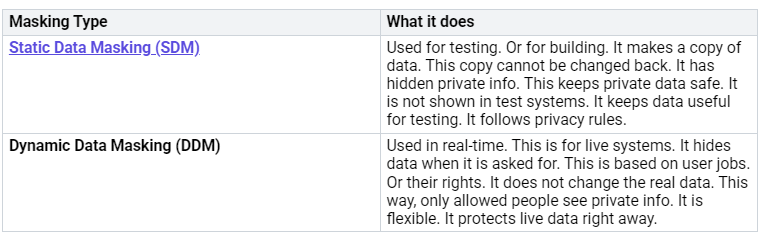
These ways to hide data. And these tools. They are very important. They help build data solutions. These solutions follow privacy rules. They work in Microsoft Fabric. They help manage private info well.
Monitoring and Performance
Always watching and making things better. This is key for any Microsoft Fabric solution. Finding problems. Making sure things work well. This needs a plan.
Many tools help with watching:
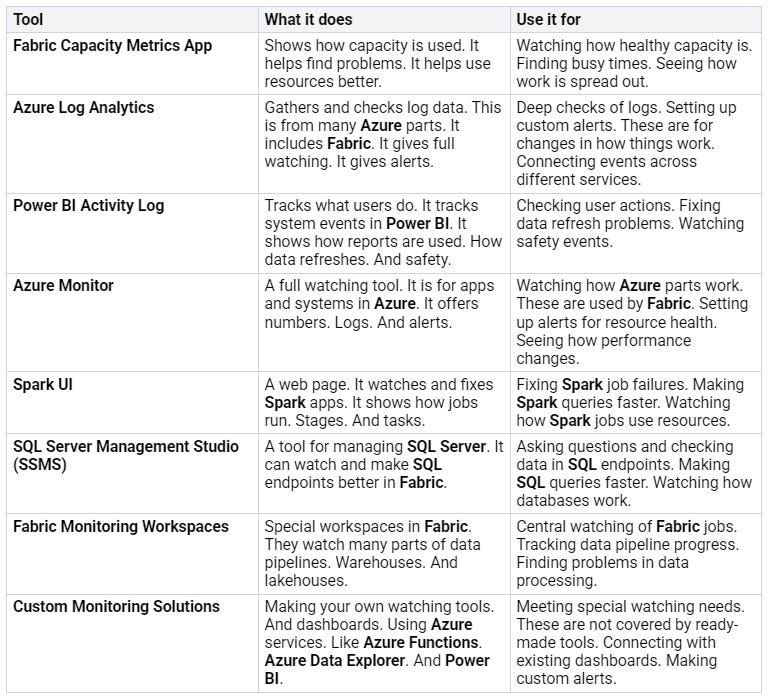
Do these best things for top performance:
Optimize OneLake Storage Structure: Divide data. Use Delta format. Remove old data. Use compression. This makes data access faster.
Efficiently Design Pipelines in Data Factory: Move less data. Process in batches. Use many paths at once. Watch and log pipeline runs. This makes data work smoother.
Maximize Power BI Query Performance: Make total tables. Use Import mode more than DirectQuery. Make data models better. Improve DAX queries. This makes data easier for users.
Tune Lakehouse and Warehouse Performance: Use indexing. Use caching. Use ready-made views. Set up how many things run at once. This makes data processing fast.
Implement Effective Data Governance: Make data rules strong. Control who sees data. Track where data comes from. Set rules for how long to keep data. This helps with data quality. It helps follow rules.
These plans help keep things working well. They keep things reliable. This is for all AI-driven and normal data work in Fabric.
Real-World Application
Scenario Overview
A store wants to know about its customers. It wants to see what they do. It wants to send them special ads. It wants to guess if they will stop buying. It needs to bring together many kinds of customer data.
Applying Fabric Principles
Fabric’s single platform is key. It puts together managing, looking at, and showing data. OneLake holds all customer data. This makes sure all data is the same. Fabric adds AI tools. This includes Azure OpenAI. These tools make special computer models. They guess what customers will do. The platform keeps data safe. It guards private customer info. All private customer info is handled very carefully. This follows all rules. The plan uses Azure tools for more safety. It keeps private info safe all the time.
Architectural Choices
The plan makes data work better together. It puts all data in one place. It uses ready-made links for things like Azure SQL. Standard ways to move data make it steady. Automatic data work is very important. Triggers that react to events give quick answers. Looking at live data is better with fast memory work. This gives quick ideas. A building block plan is used. This lets it grow easily. Auto-scaling changes resources as needed. Safety and rules are most important. IAM gives access based on jobs. Data is hidden when still and when moving. Regular checks protect all private info. The Azure system gives a safe base for customer data. Azure also helps protect private info well.
Addressing Challenges
Problems with data quality are fixed. This is done by checking data automatically. Handling many data sources uses better ways to link them. Keeping data safe and private is very important. This is true for private info. This is managed with strong IAM, hiding data, and regular checks. Fabric’s auto-scaling handles growth. This manages more private customer info well. Azure tools also help with these problems.
Making Reports Look the Same with Themes
It is important for Microsoft Fabric reports to look the same. This makes a company look good. Themes help make all reports look alike.
Making JSON Themes
Companies make one style for all Power BI reports. They use JSON themes. This means colors, fonts, and chart styles are the same. This is done through the Power BI Admin Portal. Branding teams make special JSON themes. They match the company’s look. This stops people from changing things by hand. Every report will look the same. Copilot uses these themes. It makes dashboards and pictures. It uses the company’s theme. This makes sure AI reports look right. A theme file has four parts. These are theme colors, main colors, text styles, and visual styles.
Report Visual Styles
Using visual styles makes reports look the same. For new Power BI reports, set the canvas to 16:9. Use 1920 x 1080 pixels. This makes them clear on new screens. It stops blurry or small pictures. When you put reports into other places, set them. Use models.LayoutType.Custom. Use models.DisplayOption.FitToWidth. This makes the report fill the space. It removes empty sides. It makes it look better. Scroll bars will show up if the report is too long.
// Get a reference to the container element
let reportContainer = document.getElementById(’reportContainer’);

// Embed configuration used to describe the what and how to embed
// This object is used when calling powerbi.embed
let config = {
type: ‘report’,
tokenType: models.TokenType.Embed,
accessToken: ‘YourAccessTokenHere’,
embedUrl: ‘YourEmbedUrlHere’,
id: ‘YourReportIdHere’,
permissions: models.Permissions.All,
settings: {
panes: {
filters: {
expanded: false,
visible: true
}
},
layoutType: models.LayoutType.Custom,
customLayout: {
displayOption: models.DisplayToWidth
}
}
};

// Embed the report and display it within the div container.
let report = powerbi.embed(reportContainer, config);
Company Themes
Company themes let leaders share approved JSON themes. Everyone in the company can use them. Users can get these themes. They can use them in Power BI Desktop. They can also use them in the Power BI service. This makes sure all reports follow company rules. People making reports do not need to set styles.
What We Learned and Good Ways to Work
Be careful when using new things. Companies should try new features. But do not rely too much on new Fabric features. Work with a partner who knows Fabric. They should have enough experience. This gives good advice. It is best to build solutions with tested features. These should be officially released. Plan for what will happen next. This helps avoid quick fixes. Stay updated on new features. This keeps things flexible. It matches Microsoft and Fabric.
It is very important to use Microsoft Fabric with a good plan. This way makes data systems that can grow. They are safe. They save money. We looked at main ideas. We saw how to build them. We saw things to think about. Keeping data private is most important. Hiding data well keeps people’s secrets safe. This makes sure data is managed well. We must always hide data. Microsoft Fabric changes all the time. We need plans that can change. This helps us use it best. This includes better ways to hide data. Privacy guides how we handle data. Hiding data is super important for safety. Doing this all the time keeps data good. More ways to hide data make it even safer.
FAQ
What is Microsoft Fabric by Design?
It is a smart way to plan. It uses Fabric’s tools. These tools make strong data systems. This plan helps you save money. It builds systems for the future. It keeps data private and safe. This way makes data systems big and well-run.
How does OneLake help with data?
OneLake is like one big data place. It stops copying data. Every Fabric user gets one. Teams put their data there. OneLake shows all data in one spot. This includes data from many clouds. It makes sharing data easy. Users mix data right away. No hard steps are needed.
What is Medallion Lakehouse Architecture for?
This plan puts data in three parts. The Bronze part holds raw data. The Silver part cleans data. The Gold part makes data ready for business. This plan makes sure data is good. It makes data ready for study. It helps with strong data analysis.
How does Fabric keep data safe and private?
Microsoft Fabric keeps data safe. It uses Microsoft Purview. Purview finds secret data. It makes sure rules are followed. It watches what people do. Purview labels keep Fabric data safe. Team roles control who sees what. Data controls manage parts of data. This full plan keeps data safe and private.
Can reports look the same in Fabric?
Yes, reports can look the same. JSON themes set colors and fonts. These themes work for all reports. Visual styles change how some parts look. Company themes share approved styles. This makes all reports look the same.


