

Continuous Integration (CI) and Continuous Deployment (CD) are very important. They help modern data platforms. In Microsoft Fabric, these methods make data development easier. Special CI/CD plans are key for data experts. These experts use Microsoft Fabric. They fix common problems. These problems happen when making and using data. Strong continuous integration and continuous deployment make data ready faster. This makes data better. It also helps people work together. You can learn about good ways to do this here. This shows how data solutions are now made by engineers.
Key Takeaways
CI/CD helps make data development quicker. It also makes it better in Microsoft Fabric.
Azure DevOps helps set up strong CI. This is for Microsoft Fabric projects.
Git integration helps teams work together. Branching strategies also help. They track changes.
Automated testing finds problems early. It makes data better.
Manage secrets for better security. Use role-based access control too.
Centralized pipelines help manage many environments. Templates also help.
Tools like Tabular Editor CLI automate tasks. Fabric CLI also automates tasks. They make things consistent.
Always make your CI/CD process better. This makes your data solutions strong. It also makes them reliable.
Microsoft Fabric CI/CD Overview
You need to know about Continuous Integration (CI). You also need to know about Continuous Deployment (CD). These are important in Microsoft Fabric. This knowledge helps with modern data work. Microsoft Fabric is one platform. It handles different data jobs. It helps you turn raw data into smart information.
Fabric Core Components
Microsoft Fabric has many strong tools. You use them to build full data solutions.
Lakehouses and Data Warehouses
Lakehouses and Data Warehouses store your data. They hold a lot of data. This data can be structured or not. You manage these important parts for your data projects.
Data Pipelines and Dataflows
Data Pipelines and Dataflows move and change data. They make sure data is ready for looking at. These parts are key for good data control.
Notebooks and Spark Jobs
Notebooks and Spark Jobs help process data. They also do advanced analysis. You use them for hard changes. They help with machine learning. They get deeper insights from your data.
Semantic Models and Reports
Semantic Models and Reports turn data into business ideas. You build these to help make choices. They show your findings clearly.
Why Advanced Fabric CI/CD
Advanced CI/CD plans are very helpful. They fix common problems in data work. Without them, your data work can get messy. You might have uncontrolled systems. Names might not be the same. This causes problems between quick work and needing things to be stable.
Accelerating Data Delivery
Advanced CI/CD makes data delivery faster. You get new features to market quicker. Automated testing makes code better. This means you get feedback faster. You fix problems sooner. This makes code integration smooth. It also makes deployment smooth. It lowers human mistakes.
Enhancing Data Quality
You make data quality better with advanced CI/CD. Automated testing finds bugs early. This means only good code gets deployed. Automated deployment makes deployments consistent. This lowers errors. Organized pipelines check data. This makes sure data changes are the same. This builds trust in your data. Git-based version control helps teams work together. It shows what changes were made.
Fostering Collaboration
Advanced CI/CD helps your teams work together better. Many engineers might change the same semantic model. This can cause problems. Hybrid CI/CD pipelines combine database projects. They also combine deployment pipelines. They find errors early. Git workflows manage SQL scripts. They also manage configurations. They use branching to keep development separate. This makes your work smoother.
Reducing Errors
You make fewer errors with automation. Automated checks and tests stop many common mistakes. This makes your solutions strong. You avoid big errors in important reports.
Enabling Auditing
Advanced CI/CD allows full checking. You can track every change. You can easily go back to old versions using Git. Automated rollbacks are a safety net. This lessens the impact of bad deployments. This strong CI/CD makes environments repeatable. They are also secure and automated. This is for your full analytics work. Fabric pipelines are very important here.
Azure DevOps Integration for CI
You need a strong base for continuous integration (CI) in Microsoft Fabric. Azure DevOps gives you the tools. It helps you handle your code. It builds things automatically. It makes sure things are good. This part shows you how to set up CI with Azure DevOps.
Azure DevOps Setup
Setting up Azure DevOps right is your first step. This makes your CI/CD pipeline smooth. This is for your Microsoft Fabric projects.
Project Creation
Start by making a new project in Azure DevOps. This project will hold all your code repositories. It will hold pipelines and work items. When you set up your project, think about these good ways:
Use CLI or PowerShell: You can work with your Fabric workspace. This is for automation. It helps with how things are set up.
Parameter Management: Change parameters as needed. These include Lakehouse ID and Workspace ID. You can use Azure DevOps pipeline variables. Or you can use parameter files.
Version Control: Keep notebooks and files in Azure Repos. This tracks changes. It lets you go back to older versions.
Deployment Automation: Use Azure DevOps deployment pipelines. These automatically deploy things. They check things. They test things. They move things to UAT.
APIs: Use Fabric REST APIs. This is for strong links to your DevOps work.
PowerShell: Make deployment tasks automatic with PowerShell scripts. Microsoft gives many examples.
CLI: Use the CLI for quick, one-time deployments. It is also for management. This is good for people who use command lines.
Service Connections
Service connections let Azure DevOps link to your Microsoft Fabric environment. This is done safely. You need to make a service principal in Azure Active Directory. This principal will log in to your Fabric workspace.
Create Azure DevOps Pipeline: Go to Pipelines. Choose “New Pipeline.” Then choose “Azure Repos Git YAML.” Pick your Git Repo. Select the
deployment-pipeline.yamlfile.Create Secret Variable: In Variables, make a new secret variable. Name it “CLIENT_SECRET.” This holds the service principal’s client secret. It logs in to your Fabric workspace. Always keep client secrets in a DevOps library. Or use KeyVault for better safety.
Run Your Pipeline: After saving, run the pipeline. Give details for the target Microsoft Fabric workspace.
Fabric Version Control
Version control is very important. It helps teams work together. It tracks changes. It manages different versions of your code.
Git Integration
Choosing between Azure DevOps and GitHub for Git integration is a big choice. Both are very good. But Azure DevOps often works better with Microsoft products.
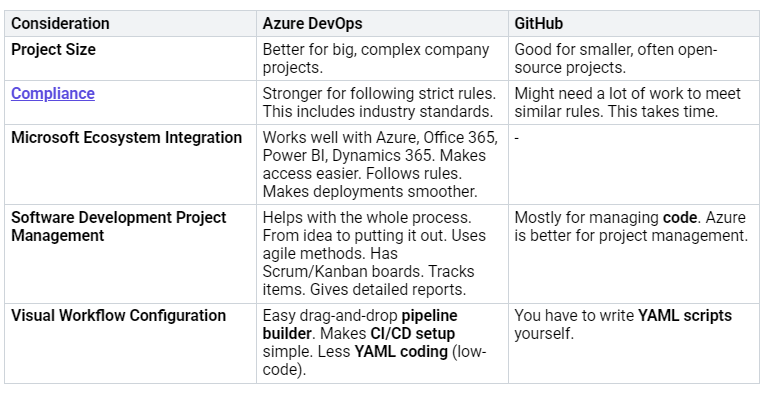
Think about these things when you choose:
Team Skillset & Ecosystem: Use Azure DevOps if you already use Azure pipelines, boards, and repos. This gives you a full DevOps tool set. It is good for big companies. It handles complex ways of working.
Pipeline Complexity: Use Azure DevOps for complex release management. For approval steps. For multi-stage pipelines. For deep rules and tracking.
Security & Compliance: Azure DevOps has strong permissions and rules for companies. This is good for regulated industries.
Branching Strategies
Good branching strategies are key. They help teams work together in Microsoft Fabric. They help manage changes. They stop problems.
Developers make a new branch in Azure DevOps.
A new developer Workspace is made. This might use a shared Fabric Capacity.
The new Workspace links to the branch from step 1.
Developers do their work. They save changes.
The Pull Request (PR) flow runs in Azure DevOps.
You click the Sync button. This is in the Notebook production Workspace for release.
The developer Workspace from step 2 is deleted.
You should also follow these tips:
Lakehouses should have their own workspaces. Keep them separate from notebooks. This stops problems with Git updates. It stops duplicate definitions.
Notebooks should have a production Workspace. Link it to a Git collaboration branch (often ‘main’). There are no problems linking to Lakehouses in other Workspaces.
Short-lived developer Workspaces are best. This avoids odd issues. Making and deleting them needs admin rights.
The ‘branch-out’ option in Microsoft Fabric makes it easy. You can set up new branches from existing workspaces. This feature helps make separate feature branches. Individual developers can work on these. Then they save changes to the main place. This makes development smoother. It also helps with version control and teamwork.
Code and Config Management
Managing different kinds of Microsoft Fabric artifacts is important. This is done within Git repositories. It makes sure of version control and teamwork. Microsoft Fabric’s Git integration supports more and more items:
Data Engineering items: Environment, Lakehouse (preview), Notebooks, Spark Job Definitions.
Data Science items: Machine learning experiments (preview), Machine learning models (preview).
The usual way to manage Fabric artifacts like notebooks is:
A Microsoft Fabric development workspace links to a Git repository (now Azure DevOps). A workspace admin does this.
Checking out a branch puts the supported items into the workspace. This matches what is in the branch.
You make changes in the development area. You test them. Then you save them to the development branch.
You combine changes into the main branch. This is either directly or with a pull request.
The final state of the main branch then goes to the integration area.
Workspace items show their current state. (synced, conflicting, unsaved, etc.). You can sync both ways.
Tabular Editor CLI is very important. It helps manage semantic models. It helps with deployment in CI/CD scenarios. You can automate DAX queries. This is done through the XMLA endpoint. You can also run the Best Practice Analyzer (BPA). This finds rule breaks. Tabular Editor CLI helps manage and deploy model metadata. This is through the XMLA read/write endpoint. It also helps set up and use source control for Fabric capacities. Tabular Editor’s ability to work with model metadata formats like TMDL helps developers work together. Source control lets you manage and combine changes. This is from many developers.
Using ‘pbip’ for Local Dev
For working on Power BI projects on your computer, use the ‘pbip’ format. This lets you manage your semantic models and reports as code.
Copy the repository to your computer (once).
Open the project in Power BI Desktop. Use the local copy of the PBIProj.
Make changes. Save updated files on your computer. Then save them to the local repository.
Send the branch and saved changes to the remote repository when ready.
Test changes against other items or data. Link the new branch to a separate workspace. Upload items using the ‘update all’ button. This is in the source control panel. Do this before combining into the main branch.
CI Workflow Implementation
Making a strong CI workflow ensures your code is always checked. It is always ready to be used.
Automated Code Validation
Automated code validation is a main part of continuous integration. It finds problems early. This is in the development stage.
Automate testing: Tabular Editor CLI, with C# scripts. And the Best Practice Analyzer (BPA). It checks data models within CI/CD pipelines. This can scan all self-service datasets. This is in a tenant. It finds and flags problems early.
Branch policies: You can set up branch policies in Azure DevOps. These policies start checking pipelines. This happens on pull requests. This gives quick feedback to developers.
Artifact Building
In a Fabric CI workflow, artifacts are the parts of your solution. They can be deployed. You manage these as code.
Fabric Artifacts Defined: These include compiled .NET binaries. Also database DACPACs. And Fabric definitions. Fabric definitions include JSON, IPYNB, and SQL files. Notebooks (.ipynb) are for checking and changing data. Pipelines (.json) show how data is brought in or managed. Lakehouse table definitions (.sql) control how data is set up. Operational scripts (like PowerShell) deploy DACPACs and Fabric assets. This is done using APIs.
Managing Fabric Artifacts as Code: Treat analytics items as code. Use Git integration and deployment APIs. Manage Fabric assets with programs. Control versions of specific asset types. Export notebooks (.ipynb) as JSON documents. Export Fabric deployment pipelines (.json) as JSON definitions. Define Lakehouse schemas (.sql) in SQL files. This makes sure data is set up correctly.
Benefits: Managing as code lets you review things. Pull requests show changes. This is for pipeline definitions or notebook changes. It lets you track things. Every schema, pipeline, and notebook links to a specific Git commit. It makes sure things can be deployed. You can automatically move things between environments. This is done by importing definitions. This uses Fabric APIs.
Best Practices: Keep Fabric assets as text. This is in a
src/Fabric/folder. Provide deployment scripts (like PowerShell or CLI). These work with Fabric REST APIs. This is for importing or updating assets. This is in target workspaces. Put environment-specific details in. (like dataset IDs, storage accounts). This is done through Azure DevOps during deployment.
Triggering CI Pipelines
CI pipelines run automatically. This happens when certain things occur. This makes sure your codebase is always checked.
Pull Request (PR) Approval: The release process starts. This can include a build pipeline for unit tests. It starts once a pull request (PR) is approved. It is then combined into a shared branch like ‘Dev’.
Pushing Code Changes: Sending code changes to a Git repository often starts CI/CD pipelines. Developers often save to a Git-managed main branch.
Better Fabric CD Pipelines
Optimizing Fabric CI/CD
You can make your CI/CD process better. This part shows advanced ways. These ways make your data solutions better. They make them more reliable. They make them work better.
Automated Testing
Automated testing is very important. It finds problems early. This saves time. It saves effort.
Notebook Unit Testing
You can test your notebooks automatically. This makes sure each part works. You write small tests. These are for specific functions. Or for calculations.
Dataflow Integration Testing
Integration testing for dataflows checks parts working together. You confirm data moves right. This makes sure your data changes are good.
Data Quality Checks
You must make sure data is correct. Use tools like Piest. This is for full data checks. It includes DAX query checks. It checks sales numbers. It checks if columns have data. You put these test results into Azure DevOps. This shows all your data quality. Branch policies can start these tests. This happens on pull requests. It gives quick feedback. It saves time.
RLS Validation with Pyabular
Pyabular helps you use your models. You can refresh parts. You can run DAX queries. You can pretend to be users. This is for Row-Level Security (RLS) checks. Pyabular only works on Windows. It is older than some new tools.
CI/CD Monitoring
You need to watch your CI/CD process. This helps you find problems fast.
Pipeline Health
Watching your pipeline health is key. You track important numbers. This helps you understand how it works:
Time To Fix Tests: How fast you fix problems. This is after tests fail.
Failed Deployments: How many deployments need fixing. It shows how often changes fail.
Defect Count: How many bugs are found. It shows code quality.
Deployment Size: How big a build is. Smaller sizes mean more frequent changes. It means quicker feedback.
Alerting for Failures
Set up alerts for pipeline failures. This tells your team right away. You can fix issues fast.
Logging and Auditing
You need good logs. These are for all CI/CD actions. This helps track changes. It helps fix problems. Auditing helps meet rules.
Fabric CI/CD Security
Security is a big deal. This is for your Microsoft Fabric environment. You must protect your deployment pipelines.
RBAC for Pipelines
Use Role-Based Access Control (RBAC). This is for your deployment pipelines. Only approved users can do things.
Principle of Least Privilege: Give users only needed access. This limits harm.
Segregation of Duties (SoD): Divide tasks among people. This stops problems. It lowers risks. Developers write code. Operations teams deploy.
Mapping out Permissions and Privileges: Define clear roles. Define specific permissions. Use CI/CD platform RBAC features.
Integration with CI/CD Tools: Put RBAC into your CI/CD pipelines. Use built-in features. Or use custom ones.
Automation of Role Assignment and Permission Management: Automate role setup. Use scripts. Use Infrastructure as Code (IaC). This makes RBAC rules consistent.
Separate Environments: Make different environments. (dev, test, prod). Apply specific RBAC rules to each.
Secret Management
Manage your secrets safely. This includes API keys. It includes connection strings. Use secure vaults. This stops sensitive info from showing.
Compliance Trails
You need clear compliance trails. This shows who did what. It shows when. This is for audits. It is for rules. It helps support your Microsoft Fabric solutions. It helps make them better.
Scaling Fabric CI/CD
You will face problems. This is when you use CI/CD in big Microsoft Fabric setups. This part gives you answers. It helps you handle CI/CD across many workspaces, tenants, and teams.
Multi-Environment Management
Handling many environments is key. This is for big operations. You need steady and sure deployments.
Centralized Pipelines
You can manage CI/CD. This is across many Microsoft Fabric workspaces and tenants. Here are some ways:
Deployment Automation: Make customer workspaces automatically. This includes Lakehouses, Warehouses, and Pipelines. Use templates for shared things. You can add tenant-specific changes. Start automatic deployments. Use Azure DevOps Pipelines.
Version Control with Azure Repos: Keep one true copy. This is for templates, pipelines, and settings. Use branching and merging. This keeps customer changes separate. It matches the main storage.
Pipeline Orchestration: Make CI/CD pipelines that can be reused. This is for common tasks. These tasks include deploying shared things. They set up tenant environments. They update Power BI datasets. Arrange full workflows. This makes sure things deploy and check in order.
You can also set up your storage and environments well:
Repository Structure: Arrange storage for shared parts. Also for customer settings. And Power BI Reports.
Environment Management: Set up three environments. These are DEV, TEST, and PROD.
Deployment Pipeline Stages: Include Build, Release, and Monitoring steps.
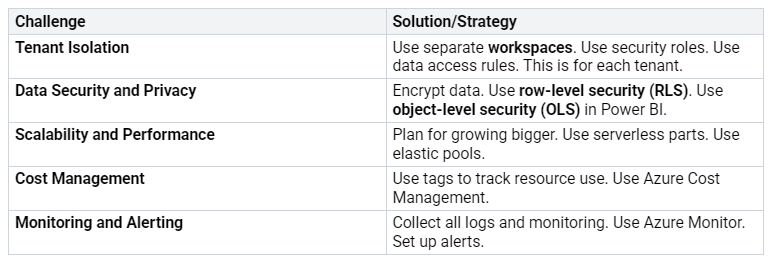
Template Deployments
You should use parameters. This makes pipelines that work. They work across companies and tenants. This makes your deployment pipelines for growing solutions.
DevOps Tool Integration
Adding different DevOps tools makes you better.
Azure Data Factory
Azure Data Factory helps with complex data work. It handles data joining. This is across different sources.
Custom Scripting
Custom scripting gives you freedom. You can change your deployment process. This is for special needs. This is good for unique situations.
Fabric CLI and Terraform
Fabric CLI and Terraform are strong tools. They work well with your CI/CD pipelines.
Automation: Make workflows automatic. This means less human work. It means fewer human errors. It helps deploy and manage complex setups.
Scalability: Easily grow Microsoft Fabric environments. Manage big deployments steadily. Use reusable templates and parts.
Governance and Compliance: Write down rules for control. Write down rules for following laws. Make sure infrastructure is safe. Follow standards. This is through Infrastructure as Code (IaC).
Integration with CI/CD: Make it easy to join with current CI/CD pipelines. Make things the same. This is across development, testing, and live setups. Make DevOps better. Make teamwork better.
Solving Common Challenges: Fix problems like ‘ClickOps’. Make big deployments simple. Make sure industry rules are followed. Make ISV deployment smooth.
Large-Scale CI/CD Best Practices
You need good ways to do big CI/CD. This makes it last. It lowers risks.
Modular Data Solutions
Design data solutions in parts. This makes them easier to manage. It makes them easier to deploy. It makes things smarter overall.
Documentation
Keep good notes. This covers how things are built. It covers settings. It covers how to run things. Good notes are key for long-term success.
Continuous Improvement
Always look for ways to make your CI/CD better. This includes making your deployment pipelines better. It also means making your data work better. Even small teams gain from these advanced ways. This makes things last. It lowers risk. Think of the “vacation test.” Can your system run without you? If not, you need better ways. This leads to better ideas and work.
You have learned about advanced CI/CD. These are for Microsoft Fabric. They help make data solutions. These solutions are good. They are fast. They can grow. Knowing these helps your data teams. They deliver good things faster. You get better quality. You work together better. DevOps changes all the time. Keep learning new tools. Use them in Microsoft Fabric. Start using these advanced ways now. Begin with Tabular Editor CLI. Use Azure DevOps pipelines. Do this in your Fabric environments.
FAQ
What is CI/CD in Microsoft Fabric?
CI/CD means Continuous Integration. It also means Continuous Deployment. You use it to build data solutions. It helps you deliver data faster. It makes data better. It helps teams work together. This process makes data solutions strong.
Why should you use Azure DevOps for Fabric CI/CD?
Azure DevOps has good tools for CI/CD. It works well with Microsoft Fabric. You can manage code. You can build things. You can deploy automatically. It helps with version control. It helps with pipelines. This makes your data work easier.
How does Tabular Editor CLI support Fabric CI/CD?
Tabular Editor CLI is a key tool. You use it for semantic models. It does tasks automatically. These include DAX queries. It also does Best Practice Analyzer (BPA) checks. This helps you control model data. It makes deployments the same.
What is Pyabular and how does it help in Fabric CI/CD?
Pyabular is a Python tool. It is free to use. You use it with Power BI models. It helps you refresh models. It runs DAX queries. You can also act as users. This is for RLS checks. This tool makes testing better. It helps after deployment.
Can you automate testing in Fabric CI/CD?
Yes, you can test automatically. You test notebooks. You test dataflows. You also check data quality. Tools like Piest help. These tests make sure data is right. They give quick feedback.
How do you manage multiple environments in Fabric CI/CD?
You manage many environments. You use central pipelines. You also use templates. This helps you deploy the same way. This is for dev, test, and production. It makes big solutions work.
What is the “vacation test” in Fabric CI/CD?
The “vacation test” checks your system. It asks if your data solution works. It asks if it works without you. If not, you need better CI/CD. This makes your system strong. It does not need one person.


