

AI is growing fast in companies. Its use goes up 30% to 40% each year. Businesses in the U.S. spent $13–14 billion on AI in 2024. You need one place for all AI tools. This place helps people share what they know. It also helps them work together. SharePoint is a great tool for this. It has flexible sections. These sections help you make a lively portal. Microsoft’s SharePoint helps you make a good Contoso AI Hub. You will learn to make your SharePoint site. You will also learn to improve it. You will use Microsoft layout capabilities.
Key Takeaways
Plan your Contoso AI Hub with a clear purpose and audience. This helps you design it well.
Use SharePoint’s flexible sections and web parts. They help you build a lively and useful AI hub.
Make your AI hub look consistent with your company’s brand. This builds trust and makes it professional.
Ensure your AI hub works well on phones and is easy for everyone to use. This makes it accessible.
Ask users for their thoughts and make changes often. This helps your AI hub get better over time.
I. Vision for Your Contoso AI Hub
Purpose and Audience
You need a clear plan. This plan is for your Contoso AI Hub. It helps you design it. First, think about its main goal. What should it do? Many companies use AI. They want happier customers. Or they want to save money. For example, a chat tool helps customers. An internal app can cut costs.
Here are some main goals for using AI:
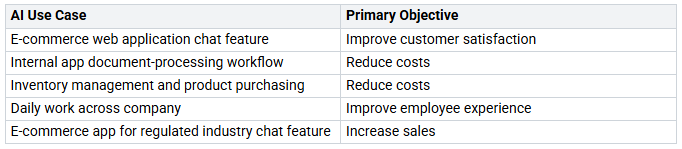
Your Contoso AI Hub will help many people. This includes AI developers. It also includes data scientists. Business users will use it too. The hub helps everyone. They will understand AI better. They will use AI better. It makes work better for all.
Key Content and Features
Next, think about what your hub will have. What features will it offer? You want one place. It should hold all AI info. This includes important papers. It also includes code examples. Project updates will be there. You can save AI models. You can save datasets. The hub will link to other tools. Azure AI services are an example. You can use a microsoft sharepoint tool. It helps organize these things.
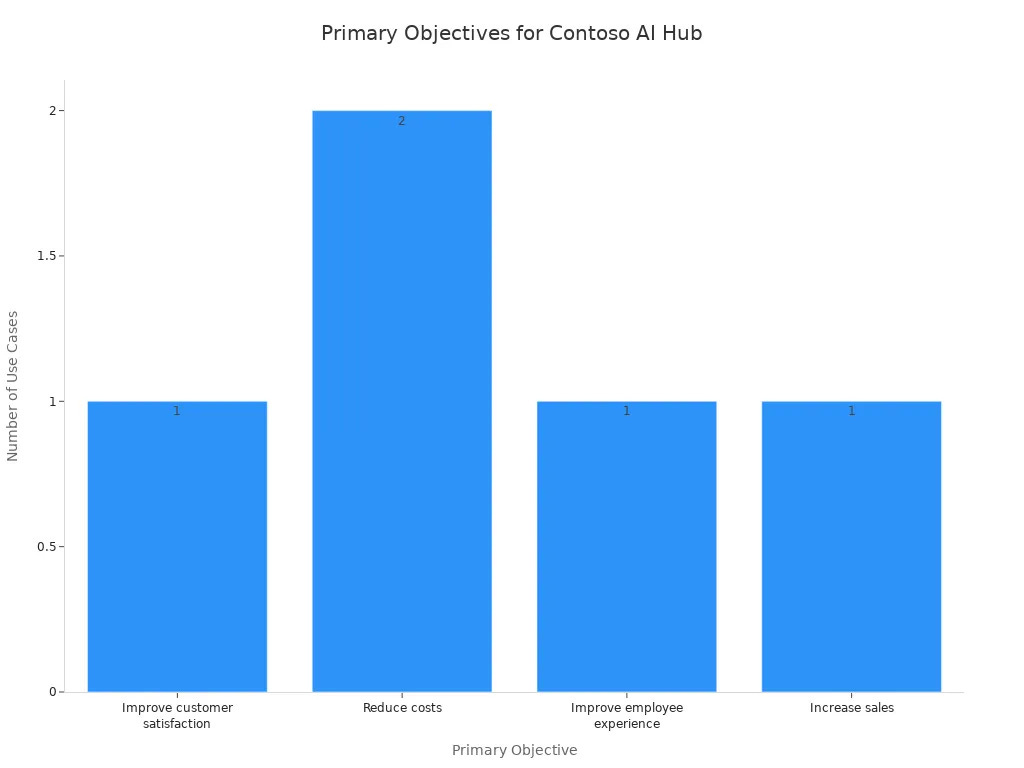
Many AI projects aim to save money. This chart shows common goals:
Your hub should be easy to use. People should find info easily. You can add news. You can add event calendars. Discussion forums are good too. This helps people share ideas. It helps them work together. A neat hub makes finding things simple.
Brand Alignment
Finally, make sure your hub fits your brand. Your Contoso AI Hub should look like Contoso. The sharepoint site should match. Use the same colors. Use the same fonts. Use the same logos. This makes it look professional. It makes it feel unified. A strong brand makes your hub official. SharePoint has flexible designs. These help you do this. When you make a new hub, think about your company. A well-branded sharepoint hub builds trust. It also makes people use it. Good indexing helps users find things fast.
II. SharePoint Flexible Sections: Design Power
III. Populating Your AI Hub with Web Parts
You have a plan. It is for your Contoso AI Hub. Now, add useful tools. SharePoint has many web parts. These help build a lively hub. You can show facts. Share helpful things. Connect your team.
Information Display Web Parts
You want to show your Contoso AI Hub. Use the Text Web Part. Write a welcome note. Explain the hub’s goal. Show key parts. For big news, use the Hero Web Part. This part shows big pictures. It has links. Show new AI projects here. Or important updates.
SharePoint also makes content easier. It uses AI. Add new sections with AI. Click “add section using AI.” Say what you want. AI suggests topics. Or it writes content. It uses your site’s info. Or a file you give it. This builds pages faster.
Use the AI-powered FAQ Web Part. This tool makes FAQs. It uses your papers. It works with talks. And other good sources. You get a guide. It helps with groups. Questions and answers. You have full control. AI helps sum up facts. This shares knowledge fast. For example, make FAQs quickly. About new AI rules. Or project guides.
Navigation and Updates Web Parts
Your hub needs easy ways to move around. Use the Quick Links Web Part. This helps users find important things. Both inside and outside AI help. Link to your company’s AI tools. Like Microsoft AI Builder. It is in Power Platform. Link to specific AI services. Such as Computer Vision. Or Natural Language Processing.
Link to outside AI tools too. These build websites with AI. Mobirise AI is one. Durable AI is another. They make websites from ideas. This gives your team many AI tools.
Keep your team current. Use the News Web Part. This shows the latest AI news. Share company AI news. Share industry trends. Everyone stays informed. About the changing AI world.
Resource Sharing Web Parts
Your Contoso AI Hub will hold files. Use the Document Library Web Part. Upload AI models here. Upload datasets here. Your team finds them easily. They can use them. Put your sharepoint documents in folders. This keeps things neat.
For big datasets, use outside storage. Link to these with the Embed Web Part. This part shows content. It is from other sites. Embed dashboards from Azure. Link to scalable storage. Like AWS S3. Or Google Cloud Storage. For free datasets, link to Hugging Face. This helps your team get data. Embed outside AI tools too. Right into your SharePoint site. This makes it smooth.
Community Engagement Web Parts
Build a strong AI group. Do it in your company. Use the People Web Part. Show AI experts. They are in your company. Others can connect with them. Ask questions. Get advice.
Talk with Yammer. Or Viva Engage Web Part. This makes a place to work together. Your team can share ideas. They can ask questions. They can talk about AI projects. This builds a community. It shares knowledge. Your hub becomes a main spot. For AI teamwork. Everyone learns and grows.
IV. Best Practices for an Engaging AI Hub
Visual Consistency and Branding
Your Contoso AI hub needs a steady look. This makes your sharepoint portal look good. Use the same colors. Use the same fonts. Use the same logos. These things make your sharepoint site easy to spot. Color codes help sort things. Same icons make patterns. Your microsoft hub’s navigation works across linked sites. This makes finding things clear.
Mobile Responsiveness
Make your hub for phones first. This makes it work well. New sharepoint pages fit all screens. They open fast. Make menus simple. Use menus that hide. Focus on main parts. Make important buttons easy to click. Make pages load faster. Shrink pictures. Make touch work better. Design big buttons. Clear up extra stuff. Use less text and pictures. Check your sharepoint site on different devices.
Content Governance
Good content rules keep your hub neat and safe. Set up strong access rules. Only allowed people can see sharepoint documents. Make clear rules for sharepoint use. Share these rules. Say who does what. This is for managing your sharepoint environment. Watch and make sure rules are followed. Check use to ensure it sticks. Use the same names for your hub sites. This helps people find them. Limit who can link sites to hubs. This keeps content right. Make hubs easy to find. Link them in the microsoft 365 app bar. Make data security in sharepoint strong. Keep private info safe with DLP rules. Make documents save automatically. Watch actions with audit logs. Sort data to show how private it is. Protect documents with labels.
User Feedback and Iteration
Ask users what they think. This makes your hub better. Use surveys or in-app tools. Use analysis tools. These find patterns. Talk to users. Focus groups give ideas. Break work into small parts. Set clear goals. Ask for feedback after each part. Make things better. Do this until your product works for users. Add feedback to planning. Use quick tests. This constant feedback makes collaboration better. It makes a user-friendly product.
Accessibility
Make sure everyone can use your hub. Follow Accessibility Standards. Meet Web Content Accessibility Guidelines (WCAG). Allow keyboard use. Allow screen reader use. Use good descriptions for images. Add full text for audio and video. Make text easy to read. Support high contrast. You can also link to azure services. These make things easier to use.
SharePoint has flexible sections. They help you. You can build a good Contoso AI Hub. This Microsoft tool is strong. It helps share knowledge. It makes teamwork better. It helps people use AI.
Plan your own AI portal. Good design helps it work. Good content helps it work.
AI changes all the time. Your Microsoft SharePoint site must change too.
FAQ
What are flexible sections in SharePoint?
Flexible sections give you more freedom. You can arrange web parts anywhere on your page. This creates unique layouts. It moves beyond old fixed columns. You get a two-dimensional grid for your content.
How do flexible sections help design an AI hub?
They let you create visually engaging pages. You can overlap content. You can group web parts. This makes your AI hub look modern. It helps users find information easily. Your hub becomes more dynamic.
Can I use pre-built templates with flexible sections?
Yes, you can. SharePoint offers section templates. These speed up your design process. You pick a template that fits your needs. Then, you make small changes. This helps you build your AI hub quickly.
How can I ensure my AI hub looks good on mobile?
Always preview your page. Check it on different devices. Flexible sections help with responsiveness. Design simple menus. Focus on key content. This makes your hub easy to use on phones.


